
Go-Pod control panel guide
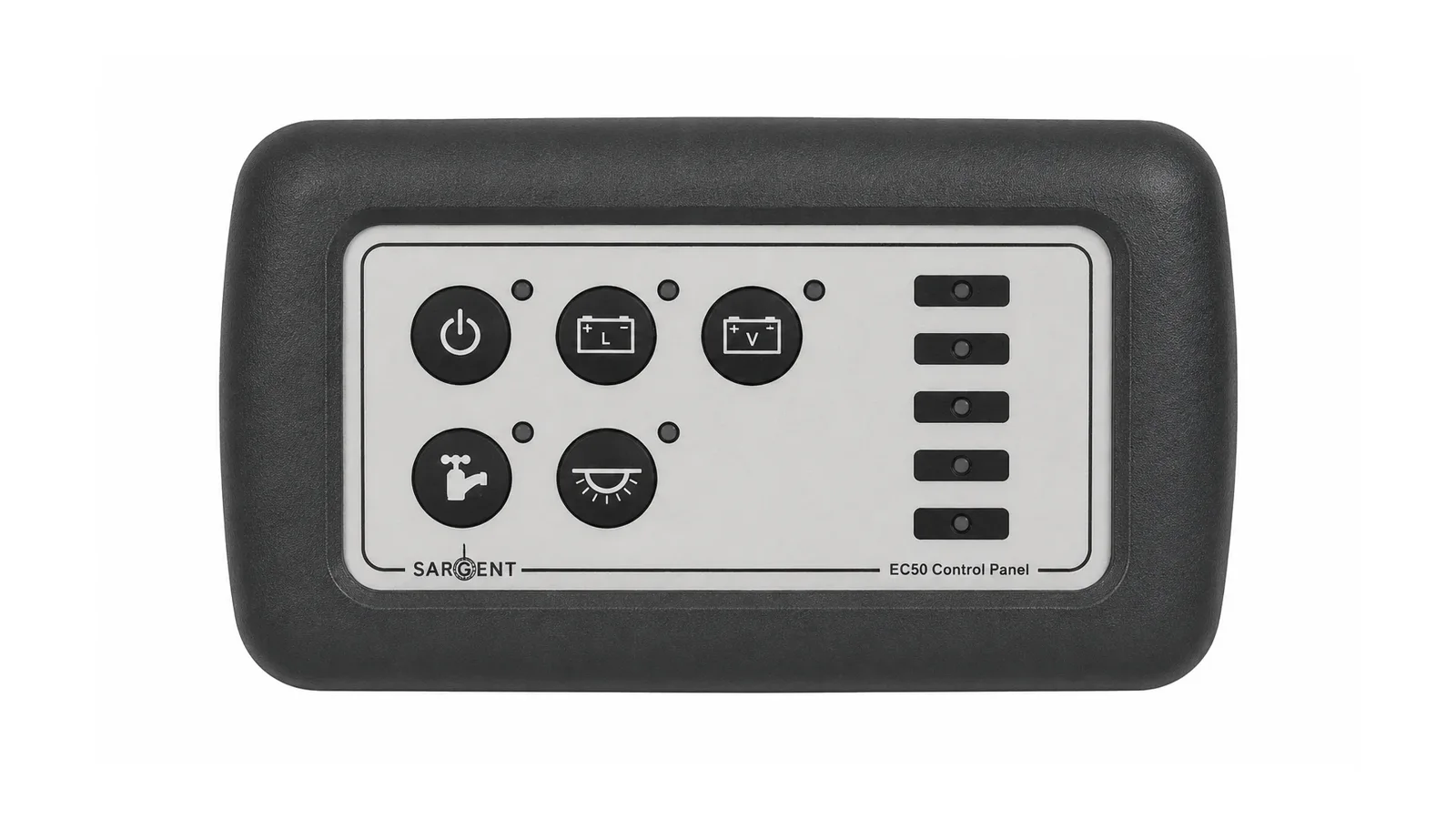
A simple guide to the Sargent EC50 control panel fitted to Go-Pods from around 2019/20 onwards, including what each button does, how to check your leisure battery and what to press when charging.
On this page4 sections
What the control panel actually does
The control panel is the small switch panel inside your Go-Pod that lets you turn the 12V system on, activate the water pump, enable lighting and check the battery level.
For most everyday use, you only need to understand a few simple controls: the master 12V power, the leisure battery display, the pump button and the lighting button.
Before you start
This guide is for Go-Pods fitted with the Sargent EC50 style control panel. Older Go-Pods may use a different control setup.
Check your panel looks similar before following the steps
Use the official manual for detailed electrical information
For electrical faults, speak to a qualified technician
- Master 12V power
- Leisure battery level
- Water pump
- Interior lighting
Tap each button to see what it does
Hover over or tap the buttons on the EC50 control panel to see a simple explanation of what each does.
1. Master power button
Turns the 12V power on and off for the Go-Pod’s interior electrical system.
Start here if the 12V system is not responding.
2. Leisure vehicle battery
Press this to select the onboard 12V leisure battery as the power source. This is the usual battery option when you are not connected to mains electricity.
Press this button to check the leisure battery level on the LEDs.
3. Vehicle battery
This button is not normally relevant to Go-Pods. It is mainly used in camper vans or motorhomes where the system can switch to the vehicle battery.
For normal Go-Pod use, you can usually ignore this button.
4. Water pump button
Press this to activate the Truma water intake pump, used to supply water to the sink tap.
Turn this on when you want to use the sink water system.
5. Lighting button
Press this to activate the lighting system. The lights can work from the 12V leisure battery or when connected to mains electricity.
Use this with the master power button for normal interior lighting.
6. Battery level display
The five LEDs on the right-hand side of the control panel show the battery charge level. When the leisure vehicle battery button is pressed, these lights illuminate to show the charge level of the onboard leisure battery.
More green lights means more battery charge available.
Do you need to press anything when charging?

In normal use, charging is simpler than many owners expect. You do not need to press the control panel buttons just to charge the onboard leisure battery.
Charging on mains hook-up
When you connect your Go-Pod to mains electricity, the leisure battery will begin charging automatically. You do not need to press any buttons on the EC50 control panel to start charging.
Connect the mains hook-up cable to the outside socket
The charger handles the battery charging automatically
The control panel does not need to be switched on just to charge
Charging while towing
When towing, power can be passed through the 13-pin towing electrics plug. You do not need to activate the control panel or press the buttons for this to happen.
Uses the 13-pin towing electrics connection
No control panel buttons are needed for charging while towing
Make sure your towing electrics are correctly wired and working
Short answer: no button pressing needed
To charge the leisure battery, connect the mains hook-up or tow with a correctly wired 13-pin socket. The control panel buttons are for using and checking the system, not for starting the charging process.
Use this guide as a simple owner reference
This page is intended to help Go-Pod owners understand the everyday controls on the Sargent EC50 panel. It is not a replacement for the official Sargent manual, professional advice, or proper electrical diagnosis.
Safety first

If something electrical is not working as expected, avoid guessing or forcing the system. Stop using it and speak to Go-Pods, your dealer, or a qualified caravan technician.
Refer to the official Sargent manual where needed
Do not attempt electrical repairs unless qualified
Ask Go-Pods or your dealer if you are unsure
Need more help with your Go-Pod electrics?
Browse the full guides hub or continue with related battery and charging guides for Go-Pod owners.